

AI Summary
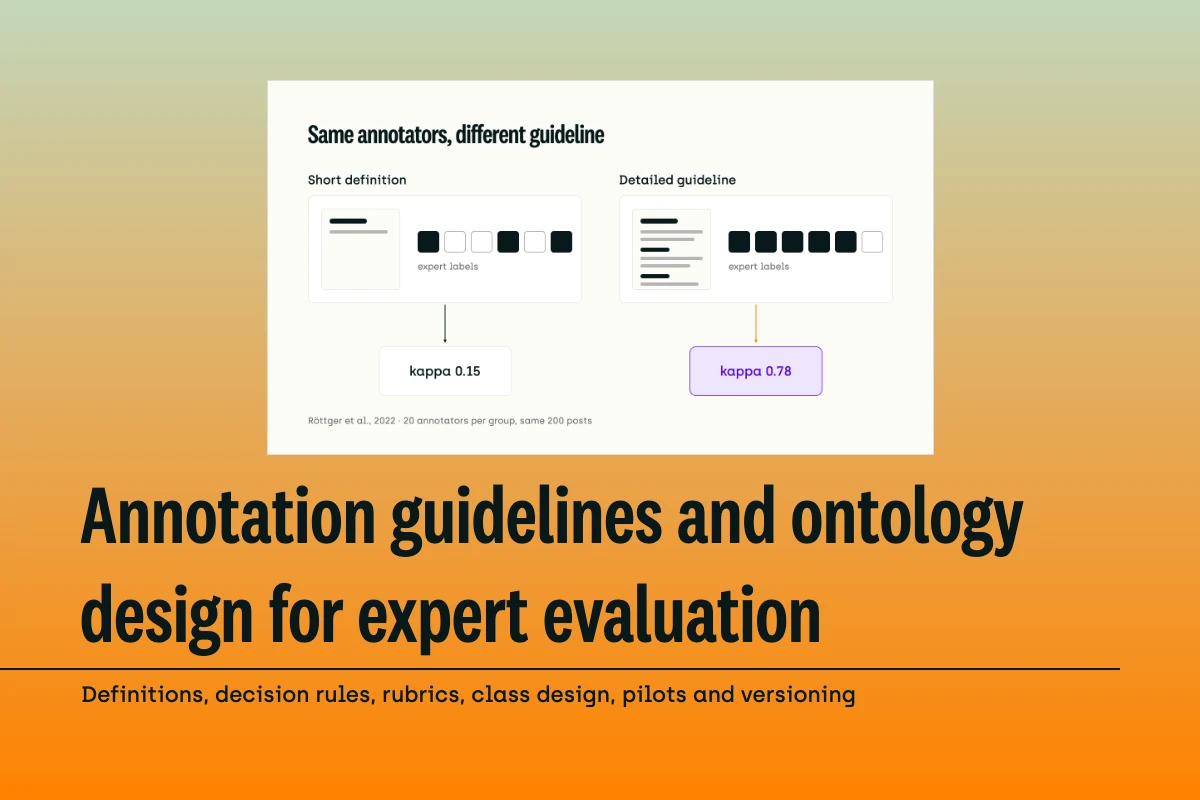
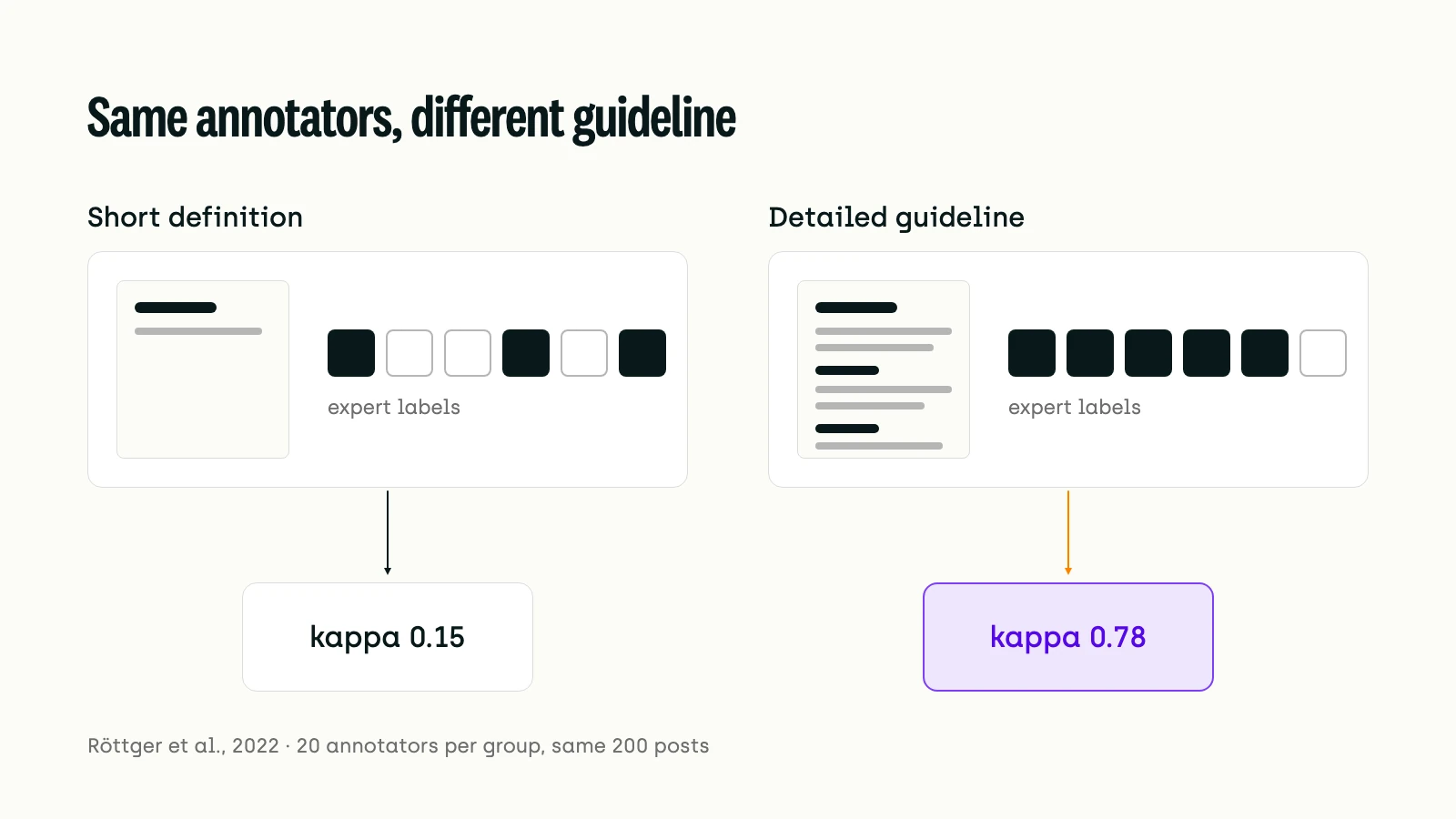
- One study saw a detailed guideline lift annotator agreement from kappa 0.15 to 0.78.
- Merge classes experts can't tell apart; add an explicit out-of-scope class.
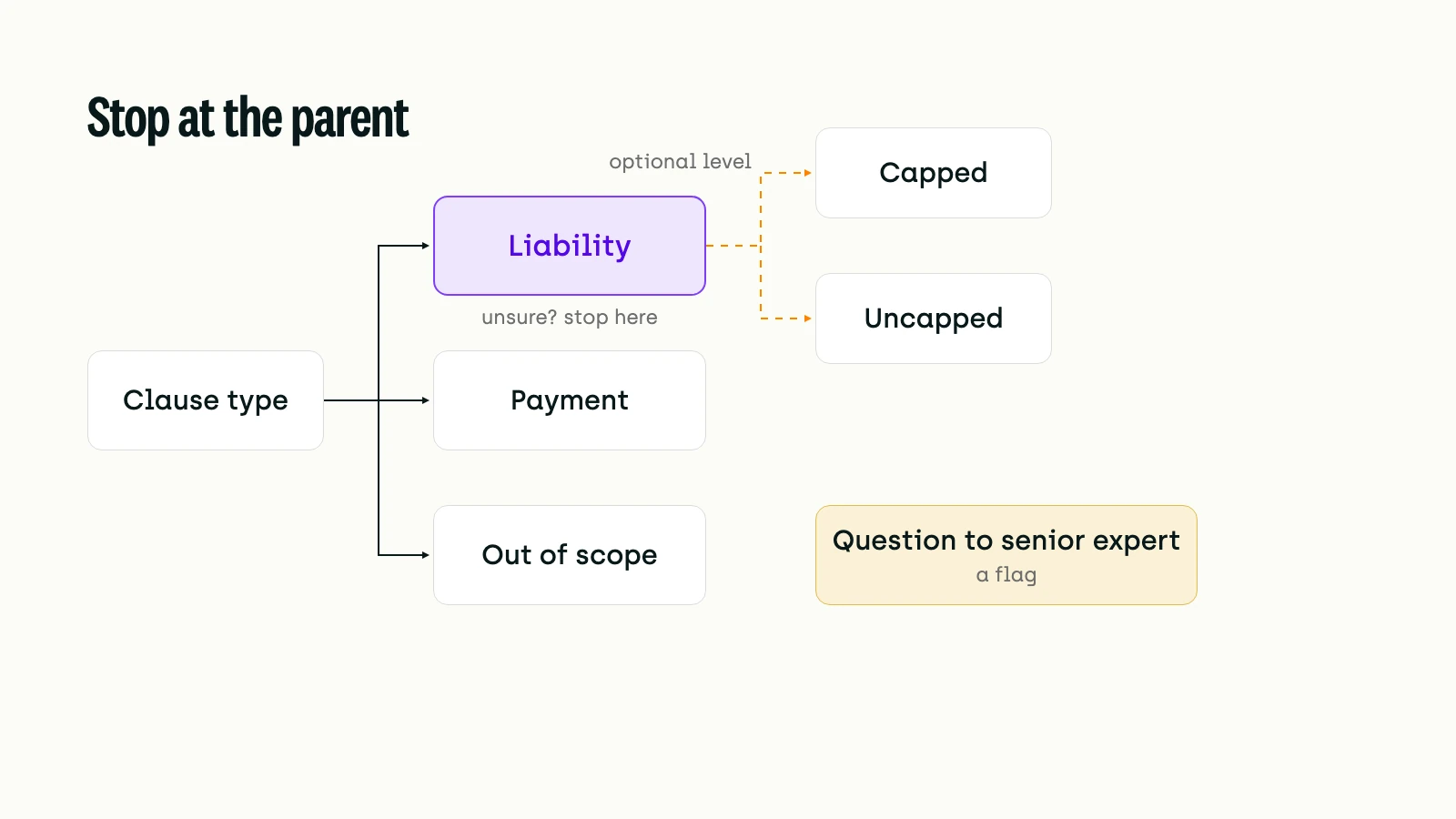
- Let unsure experts stop at a parent class, or flag the item.
- Pilot on a small blind batch, then freeze and version the guideline.
Introduction
In a 2022 experiment, researchers at Oxford, the Alan Turing Institute and Bocconi University split 60 annotators at random into three groups of 20. Each group labelled the same 200 Twitter posts for hate speech. Röttger et al. gave one group detailed annotation guidelines. Its Fleiss' kappa (a chance-corrected agreement score, where 1 is perfect agreement) was 0.78. A control group got the same question and a short definition, with no guideline. It scored 0.15, no better than a group told to use its own judgment. The annotators came from one pool, so the guideline made the difference.
Hiring domain experts doesn't remove the problem. When OpenAI built HealthBench with 262 physicians, physician-to-physician agreement on its shared grading criteria ranged from 55% to 75%. The authors list ambiguity in the criteria and "interpretation of instructions" among the causes. Without a written standard, twenty experts give you twenty standards, and the evaluation measures the reviewers as much as the model.
When scores swing from one reviewer to the next, the cause usually sits upstream. The rubric is vague, the ontology has overlapping classes, or an engineer wrote the guideline and an expert approved it at the end. This guide covers those upstream documents. It shows how to write them so experts apply them the same way, how to test them on a pilot, and how to change them without corrupting the data you already have. For when you need domain experts rather than general annotators in the first place, see our 2026 data labeling guide.
What Is the Difference Between an Annotation Guideline, an Evaluation Rubric and an Ontology?
The ontology defines what an expert can say about an item: the classes, their attributes and how they nest. It is also called the taxonomy, label schema or class list. The annotation guideline says when each label applies. It holds the definitions, decision rules and examples, plus instructions for items that fit nowhere. The evaluation rubric is the guideline for judging model outputs: the criteria a response must meet, how much each one matters and how to score it. A rubric defines what "good" means before anyone reviews anything.
Before writing any of these, decide what the data is for. Röttger et al. describe two paradigms. A prescriptive guideline asks every expert to apply one stated standard, which is what an acceptance test or a production model needs. A descriptive one collects each expert's own view, for when the spread of opinion is what you are measuring. In prescriptive work, every disagreement is something to fix, either in the expert's work or in the guideline.
How Do You Write Labeling Guidelines That Hold Up?
A guideline holds up when an expert who wasn't there when it was written, working alone, makes the same call as the expert who wrote it. As Artstein and Poesio summarise Krippendorff's conditions, reproducible annotation needs coders "working independently according to a written coding scheme," with instructions fixed in advance.
Our earlier dos and don'ts for data labeling guidelines covers layout and tips per task type. For expert evaluation, five elements carry most of the weight.
Definitions an outsider could apply
Define every class by what is visible in the item, not by the purpose behind it. Artstein and Poesio warn that long-term expert collaborators may agree "not because they are carefully following written instructions" but because they know what the project is for. Their agreement looks high, then drops when a new expert joins. Write for the new expert.
Decision rules for the boundaries
Experts rarely split on clear cases. They split between two neighbouring classes, or around an "acceptable" threshold. For each pair of classes that experts confuse, write the rule that separates them. For example: "If the clause limits liability but names no cap, label it X." Write the hard cases first, such as outputs that are nearly right or barely acceptable.
Edge cases with worked examples
Parmar et al. studied 14 benchmarks and found that 72.7% of the examples in crowdsourcing instructions shared one dominant pattern. That pattern then showed up in 60.5% of the collected data. Annotators copy what they are shown, so vary your examples. If every example of a "major error" is a dosage mistake, expect reviewers to under-label other kinds.
Negative examples
Show what a label is not. A near miss with the reason it fails ("not a contraindication: the interaction is documented but clinically minor") teaches the boundary faster than another clean positive. Rubric benchmarks build this in, as the next section shows.
What to do when nothing fits
"Use your judgment" is not an instruction. Give experts an explicit out-of-scope class, and a way to flag an item for a senior expert when they can't decide. The ontology section below covers both.
How Do You Write an Evaluation Rubric Experts Score the Same Way?
Break the judgment into criteria small enough to check one at a time, and weight them. Include the failures you want penalised. Then reword any criterion that two experts read differently.
Four published rubric projects show the shape. They differ more on who writes the criteria than on structure.
Criteria small enough to check
PaperBench keeps splitting each requirement until an expert could check one leaf in under 15 minutes. "The answer is clinically sound" fails that test. "Recommends emergency care for chest pain with shortness of breath" passes it.
Severity, set in advance
If every error counts the same, reviewers can't prioritise and ML teams can't triage. HealthBench gives each criterion a point value. Rubrics as Rewards uses four labels: Essential, Important, Optional and Pitfall. Most teams can work with three levels (critical, major, minor), provided each level has a definition and an example.
Negative criteria
HealthBench phrases some criteria as failures that cost points when met; Rubrics as Rewards calls them pitfalls. RUBICON learns its rubrics from conversations labelled both good and bad, because its authors found general-purpose quality metrics miss what matters in a specific domain. A rubric that only describes good answers lets a fluent, wrong answer through.
Wording no grader can misread
HealthBench's authors reworded their shared criteria "so that their intent was unmistakable to the grader." Human experts benefit from the same pass. It matters even more if an LLM judge will apply the rubric later. A judge can be consistent and still wrong, as our data story on 541,000 LLM-judge decisions shows.
Written with the expert, from the start
PaperBench's rubrics took multiple weeks per paper, from first draft to sign-off with the paper's author. The usual shortcut, where an ML engineer writes the criteria and an expert approves them at the end, skips that work. Have experts co-author the rubric from the first draft.
Before launch, check for four common mistakes:
- Vague criteria ("should sound professional") with no anchored example.
- No severity levels.
- So many dimensions and sub-rules that reviewers slow down and drift.
- No calibration run.
How Should You Design the Ontology Behind the Guideline?
Use as few classes as the decision needs, and make sure no item belongs in two of them. Nest only where the hierarchy helps the expert. Treat "other" and "unsure" as different things.
Mutually exclusive classes
Overlapping classes cause disagreement that no guideline can fix. Google Brain and DeepMind researchers re-labelled the ImageNet validation set for Are we done with ImageNet? They found near-duplicate class pairs, such as "sunglass" and "sunglasses", or "laptop" and "notebook". About 29% of the images they re-annotated held several objects or matched more than one synonym label. Test every pair of classes: can you write a rule that separates them? If not, merge them, or switch to multi-label and say so in the guideline.
Fewer classes first
Fine distinctions cost agreement. Artstein and Poesio report that when Palmer, Dang and Fellbaum grouped fine-grained verb senses into coarser groups, agreement rose from 71% to 82%. Dialogue-act research found the same. Multi-dimensional schemes got low agreement. The flat SWITCHBOARD-DAMSL tagset, with mutually exclusive tags, reached kappa 0.80. Start with classes you can defend. Split one only when the pilot shows experts can separate the halves.
Nesting depth
A hierarchy helps when the top level is the decision that matters and lower levels add detail. It also gives experts a fallback. Artstein and Poesio describe the DIT++ dialogue-act scheme, where a coder unsure about a fine class can choose its parent. Uncertainty then becomes a less specific label instead of a wrong one. Each level adds a decision per item, so add depth only where it is worth an expert's time.
"Other" is a class, "unsure" is a flag
Text-classification datasets usually define label sets that cover every example, as Larson et al. point out. Production data doesn't work that way. Their CLINC150 dataset adds an out-of-scope set next to 150 intents. Classifiers did well in scope but "struggle to identify out-of-scope queries." If your model will meet items outside the ontology, give those items a class. Define it and add examples, like any other class.
"Unsure" describes the expert, not the item. Route it to a senior expert as a question rather than storing it as a label, and track how often it comes up and on which classes. Some uncertainty is real: Pavlick and Kwiatkowski found that disagreement on language inference persisted as they collected more ratings. A class that keeps drawing flags is either badly defined or genuinely contested. The pilot tells you which.
How Do You Pilot a Guideline Before Experts Label at Scale?
Have several experts label a small, varied batch without seeing each other's work. Measure agreement per class. Revise the guideline or the ontology, and repeat until the numbers hold.
Annotation researchers call this the MAMA cycle (Model-Annotate-Model-Annotate). It is the early loop of the MATTER cycle: Model, Annotate, Train, Test, Evaluate, Revise. Pustejovsky and Stubbs set out MATTER in Natural Language Annotation for Machine Learning. In a later chapter, Pustejovsky, Bunt and Zaenen describe the loop. You propose a model, annotate a small sample, evaluate it and revise. Only then do you annotate the full corpus.
RUBICON's authors ran a compact version. Two engineers labelled 20 conversations together while agreeing on themes. They labelled 20 more independently and matched on 17. Only then did they split the rest. Copy that shape, scaled to your project.
Make the pilot sample cover the ontology
Krippendorff's guidance, as Artstein and Poesio summarise it, is that the reliability sample should cover every category. It should also cover every domain the guideline will meet. A pilot drawn only from common cases says nothing about the rare class you most need to get right.
Read agreement per class
In their own work, Artstein and Poesio found that only values above 0.8 "ensured an annotation of reasonable quality." They suggest 0.8 if a threshold must be set. They also doubt one cutoff fits every purpose, and recommend publishing a confusion matrix (a table showing, for each class, which labels other experts gave the same items) so that overall figures don't hide disagreement on rarer classes. The matrix shows which pair of classes the experts split on. Our guide to data labeling quality metrics explains how consensus and honeypot scores work.
Decide what the disagreement means
Röttger et al. put it plainly for prescriptive work: disagreement means an expert misapplied the guideline, or the guideline is inadequate. Finlayson and Erjavec list three fixes at this stage. You can rewrite the guideline, retrain the annotators or rework the model, which here means the ontology. A class pair that every expert confuses is an ontology problem. One expert who disagrees with everyone else is a training problem.
Keep the pilot items. Once a senior expert has settled the disagreements, the pilot labels become your reference set. Use them to qualify new experts and for spot checks in production. They are also the start of a golden dataset.
How Do You Version Guidelines Without Corrupting Your Data?
Freeze the guideline for each batch and give every change a version number. Record the version on the labels it governs. When an important change lands, re-review the labels it affects.
Guidelines will change. The risk is changing them silently. Artstein and Poesio note that adding rules to the written instructions "as the data are generated" undermines reproducibility, because labels made before and after follow different rules. Finlayson and Erjavec list "Track annotation guideline versions" as a core annotation task, and point out that data labelled under old and new versions will coexist.
A workable routine:
- Number the guideline, and keep a change log that says what changed and why.
- Change it between batches, not mid-batch, unless the change fixes a safety problem.
- Tell experts what changed, with an example of a label that would now be different.
- Find the labels made under the old rule that the change affects, and send them back for review.
- Re-run a short pilot when the change touches the ontology.
Datasheets for Datasets asks the same questions from the dataset user's side. Will the dataset be updated to correct labeling errors, and by whom? Will older versions stay available? Northcutt et al. estimated that at least 3.3% of test examples carry label errors, on average across ten common benchmarks. In the ImageNet validation set, the figure is at least 6%. Linking each label to its guideline version is what lets you find and fix such errors in your own evaluation set.
How Do You Set Up Guidelines and Ontologies in Kili?
Instructions
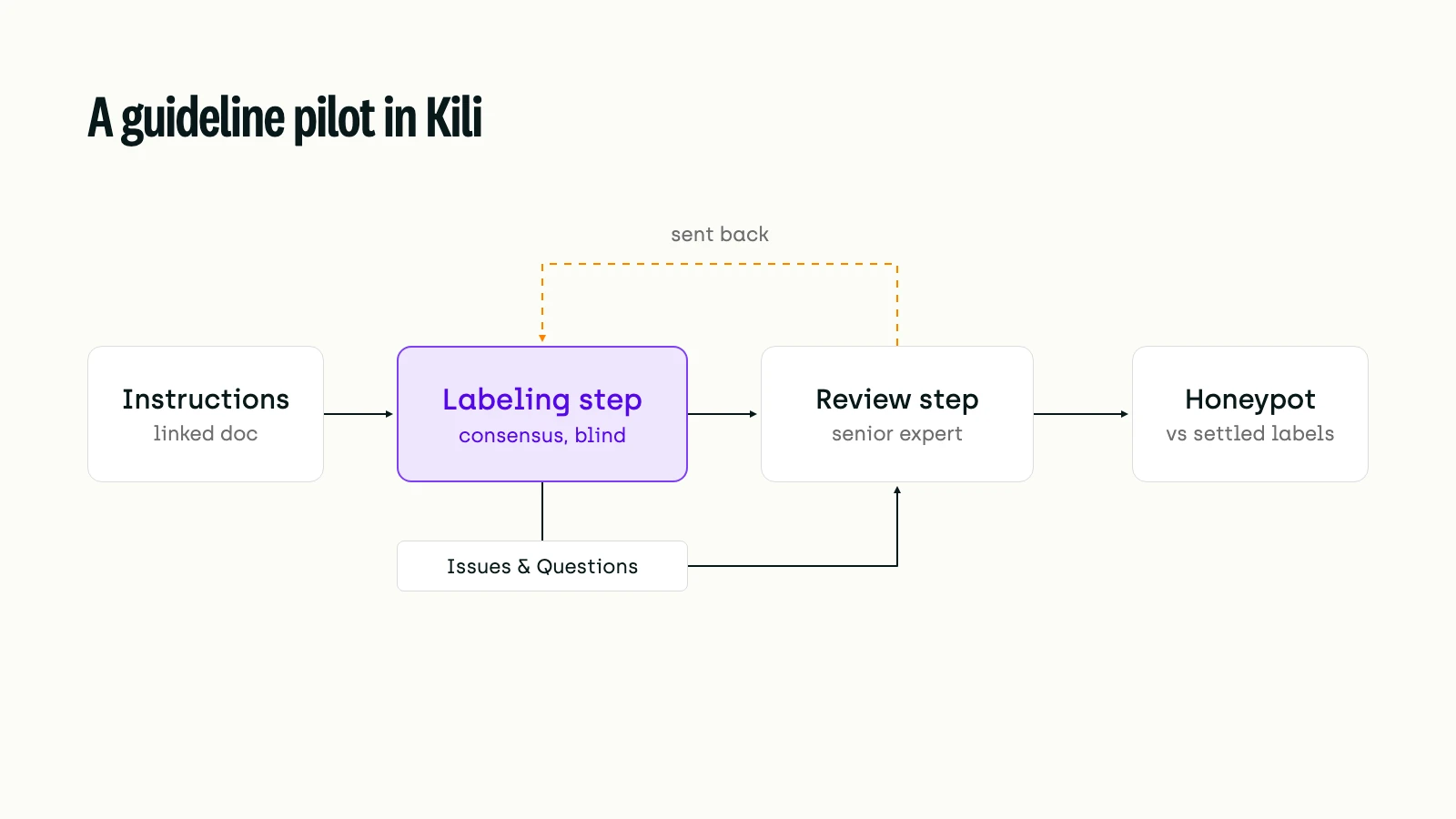
You attach the guideline as a link to a document you host, such as a Google Doc or a Notion page. You set the link in the project settings or through the Python SDK; see adding instructions. Labelers open it from Help, Instructions. You can also add short notes, images or URLs to each class as metadata (not on transcription jobs). Experts see them when they hover the information icon next to the class. That is a good place for a decision rule or a negative example. Kili links to the document rather than hosting it, so keep the version number and the change log in the document itself.
Ontology
Kili's best practices for ontology design start where this guide does, with "clearly-named, easily-separable classes." They advise iterating on the ontology and the guidelines together. They also recommend required jobs, so experts can't skip a question. Pre-defined issue categories let experts flag a bad asset quickly. Classification jobs offer dropdowns for long class lists. Since a fix in the 12 August 2026 release (26.2.0), the Labeling Jobs Editor loads and edits ontologies of up to about 1,200 classes.
Nesting
Classification and transcription jobs can be nested under a class to build a hierarchy. The 7 October 2026 release (v26.2.12) restored support for up to 8 levels of nested jobs on image, PDF and text projects. The JSON settings page still gives a lower limit, so check your project. Experts fill nested jobs from the Edit nested jobs menu, added in the 4 November 2026 release (v26.2.15). They can search for a value at any level, or stop at an intermediate level when they can't go deeper. If the next level is a required job, it stays incomplete, so make deeper levels optional where experts may legitimately stop at the parent. The 23 September 2026 release (v26.2.6) added a Show final class only setting, which displays just the deepest value of each nested classification tag.
Unsure items
Experts raise a question through Issues & Questions, on the asset or on a specific box, polygon or named entity. Reviewers answer it and send the asset back; see handling questions and issues.
The pilot
Consensus sends a set percentage of assets to several labelers, who work in parallel and can't see each other's labels. Kili's docs list identifying ambiguous instructions and edge cases as one of its uses. Once a senior expert has settled the pilot, upload those labels through the SDK as honeypot references, to score each expert against them on one workflow step.
Conclusion: The Guideline Is the Evaluation
An expert evaluation measures the model through the guideline. If the guideline is vague, the ontology overlaps or the rubric changed halfway through, the score describes the reviewers and the documents as much as the model. Röttger et al.'s numbers make the point: the guideline alone moved agreement from 0.15 to 0.78.
So spend expert time early. Co-writing a rubric, merging two classes nobody can separate, or running a 40-item pilot decides whether every review hour after it is spent consistently. As LLM judges take on more of the scoring, the same documents become their instructions too. The experts' main job shifts toward owning the standard: writing it, testing it and changing it on purpose.
Resources
Guidelines and agreement
- Two Contrasting Data Annotation Paradigms for Subjective NLP Tasks – Röttger, Vidgen, Hovy & Pierrehumbert (2022), NAACL
- Inter-Coder Agreement for Computational Linguistics – Artstein & Poesio (2008), Computational Linguistics
- Don't Blame the Annotator: Bias Already Starts in the Annotation Instructions – Parmar et al. (2023), EACL
- Inherent Disagreements in Human Textual Inferences – Pavlick & Kwiatkowski (2019), TACL
Rubric-based evaluation
- HealthBench: Evaluating Large Language Models Towards Improved Human Health – Arora et al. (2025), arXiv, OpenAI
- PaperBench: Evaluating AI's Ability to Replicate AI Research – Starace et al. (2025), arXiv, OpenAI
- Rubrics as Rewards: Reinforcement Learning Beyond Verifiable Domains – Gunjal et al. (2025), arXiv preprint, Scale AI
- RUBICON: Rubric-Based Evaluation of Domain-Specific Human-AI Conversations – Biyani et al. (2024), AIware, Microsoft
Ontology design
- Are We Done with ImageNet? – Beyer et al. (2020), arXiv, Google Brain and DeepMind
- An Evaluation Dataset for Intent Classification and Out-of-Scope Prediction – Larson et al. (2019), EMNLP-IJCNLP
Annotation process and versioning
- Natural Language Annotation for Machine Learning – Pustejovsky & Stubbs (2012), O'Reilly
- Designing Annotation Schemes: From Theory to Model – Pustejovsky, Bunt & Zaenen (2017), Handbook of Linguistic Annotation, Springer (author copy)
- Overview of Annotation Creation: Processes and Tools – Finlayson & Erjavec (2017), Handbook of Linguistic Annotation, Springer
- Datasheets for Datasets – Gebru et al. (2021), Communications of the ACM
- Pervasive Label Errors in Test Sets Destabilize Machine Learning Benchmarks – Northcutt, Athalye & Mueller (2021), NeurIPS Datasets and Benchmarks
Kili
- 2026 Data Labeling Guide for Enterprises: Build High Performing AI with Expert Data
- Data Labeling Guidelines: Dos, Don'ts and Pro Tips
- Who Judges the Judge? A Data Story on 541,000 LLM-Judge Decisions and an Annotator-Pool Audit
- Top Data Quality Metrics for Assessing Your Labeled Data
- How to Build Golden Datasets for Testing, Fine-tuning, and Evaluating AI Models
- Kili docs: Adding instructions
- Kili docs: Best practices for ontology design
- Kili docs: Customizing the interface through JSON settings – nesting jobs
- Kili docs: Changing and updating labels – filling nested jobs, stopping at an intermediate level
- Kili docs: Handling questions and issues
- Kili docs: Consensus overview
- Kili docs: Honeypot overview
- Kili changelog, 12 August 2026 (26.2.0) – ontologies of up to about 1,200 classes
- Kili changelog, 23 September 2026 (v26.2.6) – Show final class only
- Kili changelog, 7 October 2026 (v26.2.12) – up to 8 levels of nested jobs
- Talk to the Kili team
Frequently Asked Questions
What should annotation guidelines include?
Start with a definition for every class and decision rules for the pairs of classes experts confuse. Add varied worked examples and negative examples that show near misses. Say what to do with items that fit no class, or that an expert can't decide. Finish with a version number and a change log.
What is an annotation ontology?
The set of classes, attributes and nesting that defines what an expert can say about an item, also called a taxonomy or label schema. The ontology defines which classes exist; the guideline explains when each one applies.
What inter-annotator agreement is good enough?
Computational linguists have long aimed for a chance-corrected score above 0.8, using kappa or Krippendorff's alpha. They treat 0.67 to 0.8 as tentative. Artstein and Poesio suggest 0.8 if a threshold is needed, but no single cutoff fits every task. Look at agreement per class and at the confusion matrix to see where experts split.
Should an annotation ontology have an "other" class?
Yes, if the model will meet items outside the defined classes, as production models usually do. Define it and give examples like any other class. Keep "unsure" separate: route it to a senior expert as a question, not a label.
How often should you update labeling guidelines?
Whenever a pilot, a review or a new failure mode shows that a rule is unclear or missing, but between batches rather than mid-batch. Version each change, tell experts what changed, and re-review the labels it affects.
Ready to Give Your Experts One Standard?
Kili lets domain experts label and review against your guideline, with nested ontologies, questions routed to reviewers, and consensus and honeypot checks set in each project's workflow. Talk to the Kili team about setting up an expert evaluation project.