

AI Summary
- Read at least 100 real traces before choosing metrics or judges.
- Open coding notes what went wrong; axial coding groups those notes into countable failure modes.
- A single domain expert with final say keeps labels consistent.
- Build a review tool for one expert; adopt one for many reviewers or on-premise data.
Introduction
Nurture Boss builds an AI assistant for the apartment industry. Hamel Husain tells the story in his field guide to improving AI products. The team's first step was a simple viewer for conversations between the assistant and its users. Beside each conversation sat a space for notes on what went wrong. Those notes turned up a specific problem. When users asked to reschedule a tour with a relative date, such as two weeks from now, the assistant failed 66% of the time. Three issues accounted for over 60% of all problems. After targeted fixes, date handling success went from 33% to 95%.
In LLM evals, error analysis means reading your application's traces, noting what went wrong in each, then grouping and counting those failures. A trace is the full record of one request. It holds the user input, any retrieved context, tool calls, intermediate steps and the final output. The result is a failure taxonomy specific to your product, and it decides which evals you write.
Our AI model evaluation guide covers the methods and metrics. This guide covers the step before them, and a question that comes with it. Hamel Husain and Shreya Shankar's AI evals FAQ argues the two together. Error analysis is the core activity, they write, and a custom annotation tool is the best investment for doing it. This guide explains how error analysis works and who should do it. Then it covers which failures deserve an eval, and when to build your own review tool.
What Is Error Analysis, and Why Does It Come First?
Error analysis is a structured read of real outputs that ends in a ranked list of how your LLM application fails. It comes first because every later step depends on it. A metric, a rubric or an LLM judge measures something. Error analysis tells you what is worth measuring.
The FAQ's entry on the topic opens with: "Error analysis is the most important activity in evals." Their working rule for evaluators follows from it: "Write evaluators for errors you discover, not errors you imagine." Off-the-shelf scores for helpfulness, coherence or toxicity measure generic properties. Your product's failures are rarely generic. In the field guide, Husain describes teams that celebrated a 10% gain in a "helpfulness score" while users still struggled with basic tasks. His verdict: "Generic metrics are worse than useless."
Research on how people write evaluation criteria gives a second reason. In Who Validates the Validators? (UIST 2024), Shreya Shankar and colleagues watched nine industry practitioners build LLM evaluators with a tool called EvalGen. Participants added new criteria when they saw new kinds of bad output. They also reinterpreted existing criteria as they graded more examples. The authors call this criteria drift. They sum up the loop: "users need criteria to grade outputs, but grading outputs helps users define criteria." So you can't fully specify evaluation criteria until people have judged real outputs.
A rubric or a judge prompt written before anyone reads traces encodes guesses about how the product fails. Error analysis replaces the guesses with observed failure modes, and it keeps doing so as the product and its users change.
Error analysis is also where the time goes. Husain and Shankar report that in their projects, 60 to 80% of development time went to error analysis and evaluation. They tell teams to expect most of that effort to go to looking at data, not to building automated checks.
How Do You Run Error Analysis on LLM Traces?
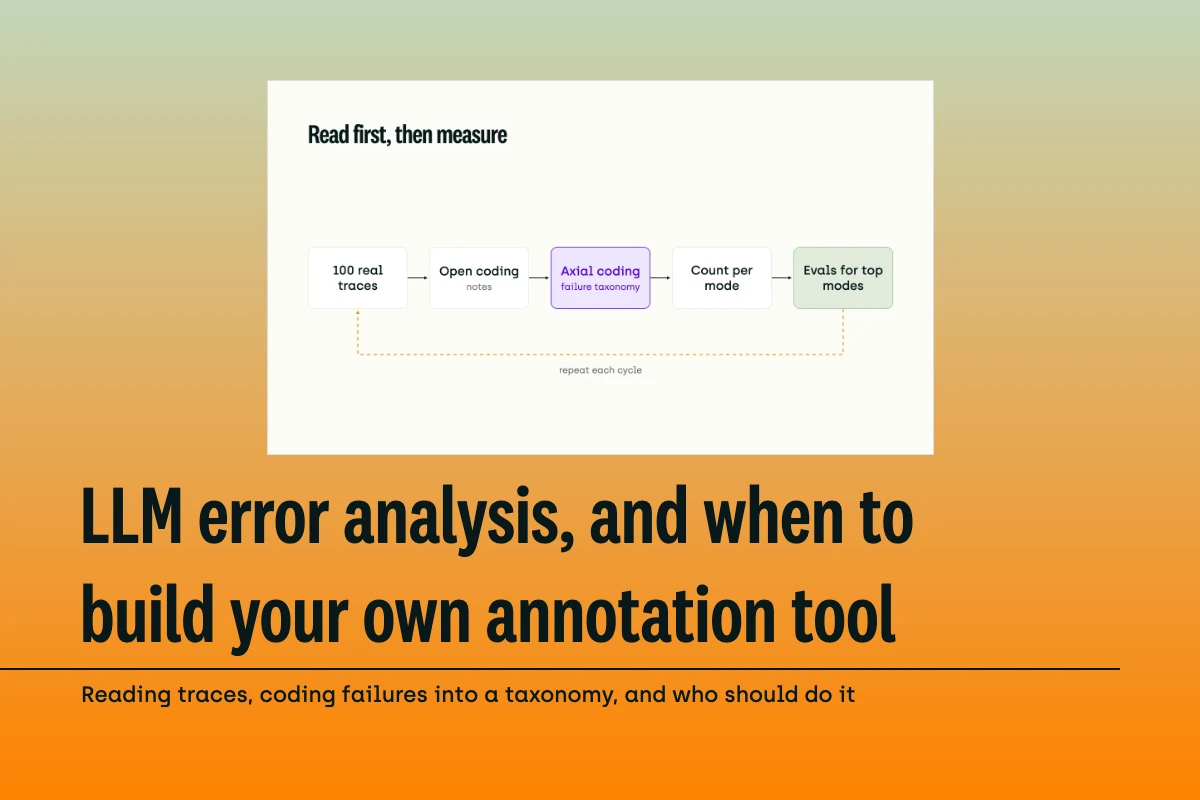
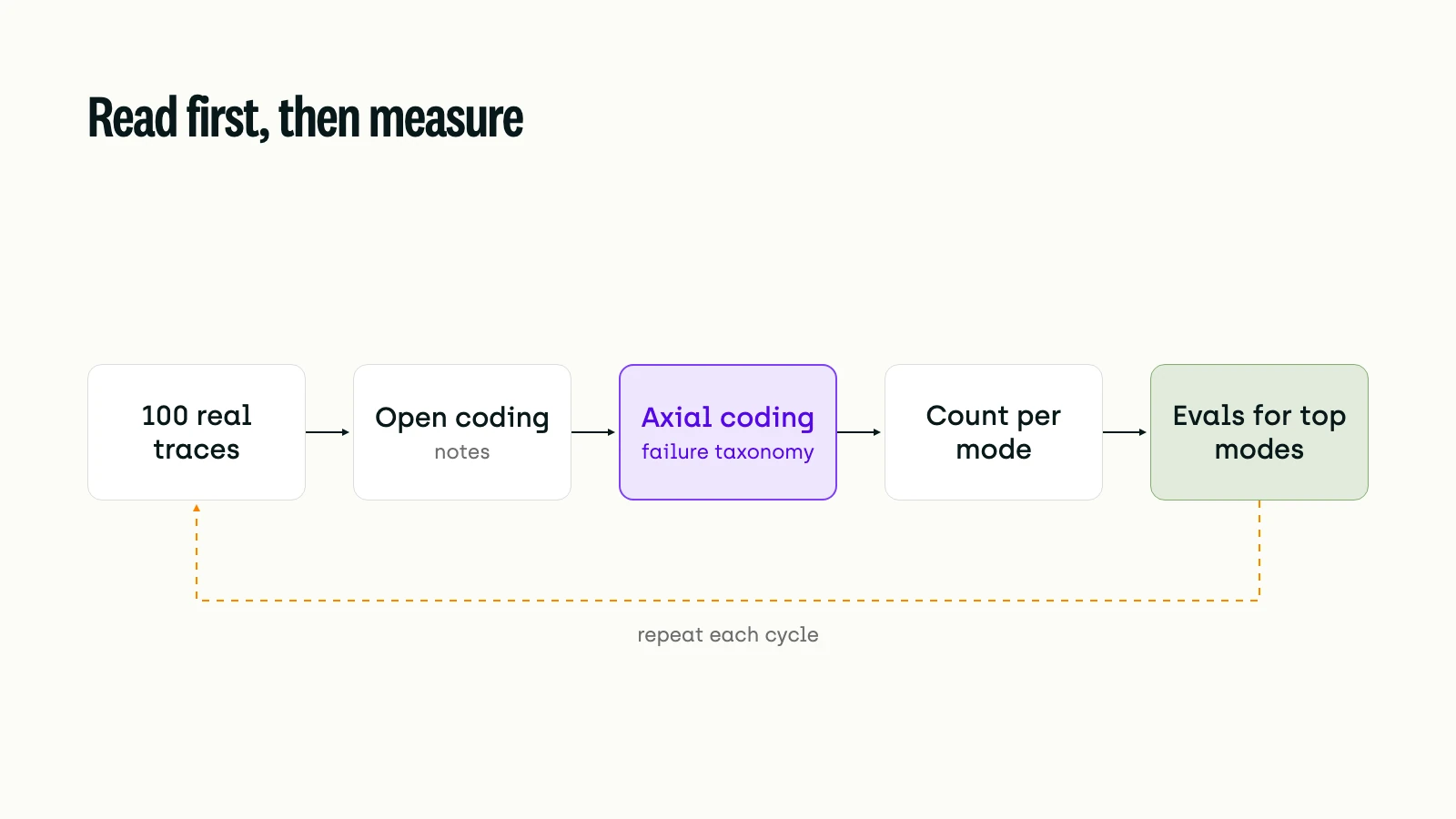
The method is borrowed from grounded theory, a qualitative research approach that Barney Glaser and Anselm Strauss introduced in 1967 to generate theory inductively from data. A design framework for grounded theory by Chun Tie, Birks and Francis describes the core moves. Open coding develops categories of information. Axial coding interconnects those categories. Theoretical saturation is the point where new data stops adding to them. For LLM traces, that becomes five steps.
1. Sample real traces
Start with real traffic, or realistic synthetic inputs if you have no users yet. Pick for spread: different features, user types, input lengths, and traces already flagged by guardrails or user complaints. The FAQ recommends reviewing at least 100 traces, and treats a pool of about 100 diverse traces as a working guardrail.
2. Open code: write what went wrong
Read each trace end to end and give it a pass or fail. For failures, write a short note in plain words. "Offered a Saturday tour; the office is closed on weekends" is a useful note. "Bad answer" is not. Don't sort or name categories yet; the point is to record what you see.
The FAQ is firm that someone on the team does this first pass by hand. Annotate at least 30 traces yourself before you look at suggestions from an AI agent. The FAQ also prefers binary pass or fail labels to 1 to 5 scales. A binary call forces a clearer decision and gives more consistent labels.
3. Axial code: group notes into a failure taxonomy
Once you have a pile of notes, group similar ones into named failure modes. The FAQ calls this the most important step. Once you have coded 30 to 50 traces, an LLM can propose groupings and save time. The person who wrote the notes still decides the final categories.
Good categories are specific to the product. Examples: "wrong date arithmetic on relative dates", "missed handoff to a human" or "cited a policy that doesn't apply to this property". "Hallucination" alone is too broad to fix or to measure. If your system retrieves documents before it answers, split retrieval failures from generation failures at this step. Our guide to retrieval-augmented generation (RAG) evaluation explains why the two need separate measurement.
4. Count
Tag each failed trace with its failure modes and count them. The count turns a set of notes into a priority list. Expect a few modes to dominate, as they did for Nurture Boss.
5. Stop at saturation, then repeat
Keep reading until new traces stop producing new failure modes or changing existing ones. Then treat the taxonomy as current, not final. The FAQ suggests reviewing at least 100 fresh traces each cycle, with cycles of two to four weeks. That makes error analysis one stage of a standing loop, which our AI model evaluation workflow guide follows from build to monitoring.
Researchers have applied the same method at scale. For Why Do Multi-Agent LLM Systems Fail?, Cemri et al. had six human experts examine 150 traces from five multi-agent frameworks. They kept coding failures until they reached theoretical saturation. The result, which they named MAST, is a taxonomy of 14 failure modes in three categories: system design issues, inter-agent misalignment and task verification. Annotators applying it independently reached a Cohen's kappa of 0.88, a chance-corrected agreement score, in the final rounds.
Which Failure Modes Deserve an Eval?
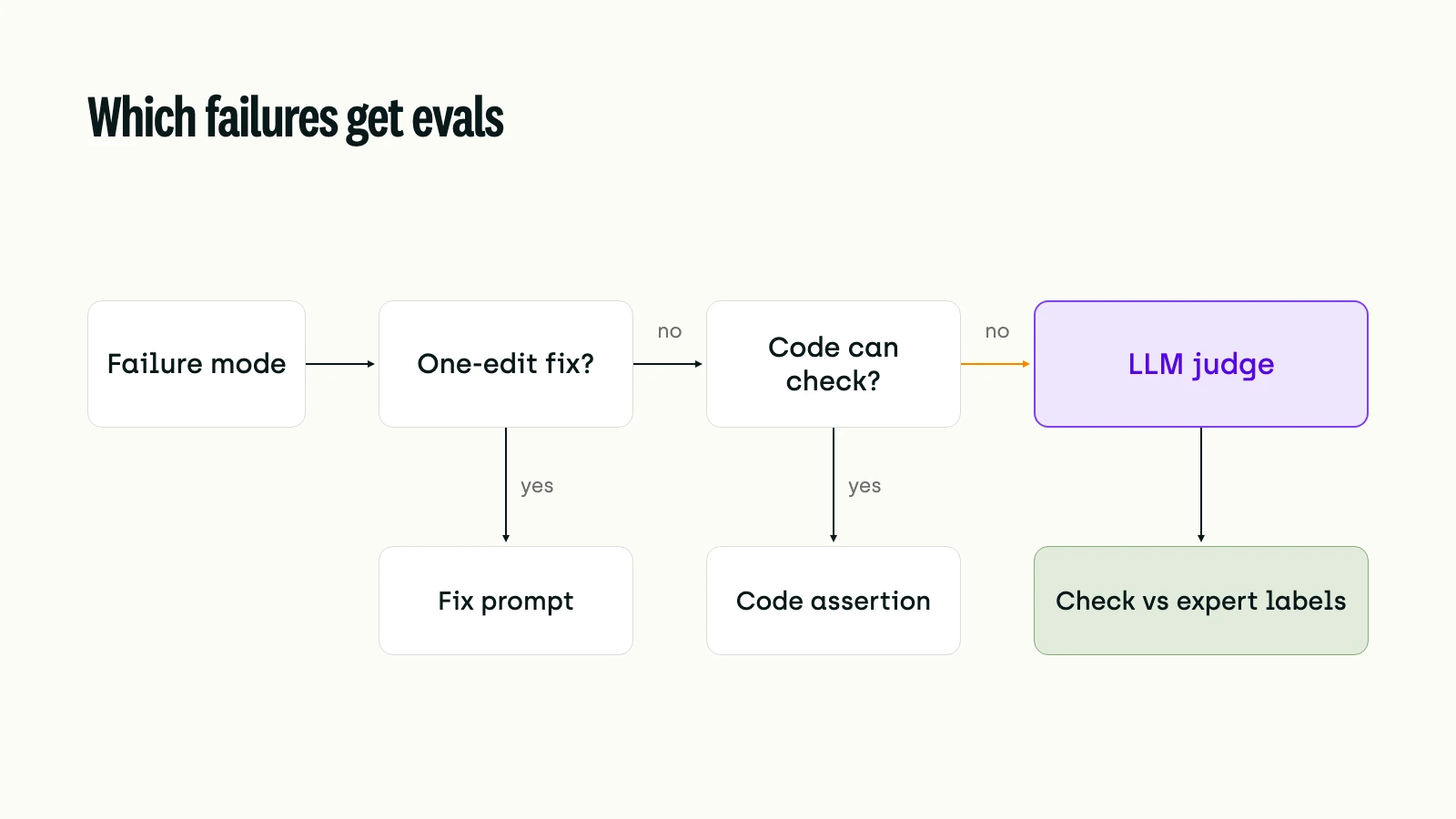
Not all of them. The count tells you where failures cluster; cost and recurrence tell you which ones need an automated check. The FAQ's advice points to an order of work.
- Fix the obvious gaps first. If the prompt never told the model about weekend opening hours, fix the prompt. An eval for a failure you can remove in one edit is maintenance with no return.
- Use code where code can decide. Format errors, missing fields, wrong units and answers that can be checked against a known reference all fit a simple assertion or regex. These checks are cheap to build and cheap to run.
- Use an LLM judge for failures that persist and need judgment. The FAQ notes that a judge needs 100 or more labeled examples and ongoing maintenance, so reserve it for problems you will keep iterating on. Write one judge per failure mode, with a binary verdict.
- Validate every judge against human labels. Use a held-out set of labeled traces. Measure the true positive rate (how many real failures the judge catches) and the true negative rate (how many good outputs it passes).
The traces your expert has already labeled become that test set. Our data story on who judges the judge shows how judges can pass consistency checks and still disagree with the experts they stand in for. Over time, those labeled traces also become the core of a golden dataset for regression testing.
Who Should Do Error Analysis?
The person who can tell a wrong answer from a plausible one: a lawyer for a legal assistant, a clinician for a clinical summariser. An engineer can spot a malformed tool call. Only a domain expert can say that a well-formed answer applies the wrong rule.
For small and mid-sized teams, the FAQ recommends one domain expert as a "benevolent dictator" with final say over labels and categories. One person avoids conflicting labels and the slowdown of a committee. It also warns that outsourcing error analysis to people without domain expertise is usually a big mistake. The FAQ draws a line here: hiring external subject-matter experts to act as your internal experts doesn't count as outsourcing.
Engineers should still read traces. The first pass of open coding is how a team learns what its system does, and the FAQ says not to skip or delegate it. The expert then owns the taxonomy and the labels the evals are measured against.
Criteria drift applies to experts too. As the expert reads more traces, definitions will shift. Keep a short changelog for the taxonomy, so a label from week one can be read against the definition in force at the time. When you add a second reviewer, measure agreement on a shared sample before splitting the work, as the MAST authors did.
Should You Build Your Own Annotation Tool or Adopt One?
The FAQ's advice is "Build a custom annotation tool." It calls this "the single most impactful investment you can make" for an evaluation workflow. Husain writes that teams with custom tools often iterate about 10 times faster. That figure is his observation across client work, not a controlled measurement.
His reasons double as a requirements list, whoever writes the code:
- All the context from multiple systems shows in one place.
- Data renders the way the product shows it: markdown, images, widgets, buttons.
- The workflow fits the team, with its own filters, sorting and progress bars.
The FAQ lists what a good review interface does. It renders traces in a form that suits the domain, and it supports keyboard navigation and shows progress. Reviewers can filter by metadata and search. Traces already flagged by guardrails or automated evaluators come up first. The general rule: "Keep your annotation interface minimal."
The same FAQ names the case for adopting a tool: coordinating dozens of distributed annotators with enterprise access controls. On the Hacker News thread about the FAQ, one commenter described building such a tool from scratch as "a full-time engineering project in and of itself."
Both are right, at different stages. The FAQ suggests building the interface with an AI coding assistant, which keeps a first trace viewer for one expert a small job. The engineering cost arrives with the second reviewer. Now you need assignments, a review step and rules that stop people from approving their own labels. You need a way to send a trace back with a comment, and a taxonomy that can change mid-project. Add access control, and in regulated settings, data that can't leave your servers.
A common path uses both, in order. Start with a throwaway viewer while one expert open codes the first hundred traces. Move to a platform once the taxonomy is stable and labeling becomes a team workflow. Our older piece on building or buying a data labeling platform covers the same trade-off for training data.
How Do You Run Error Analysis in Kili?
Kili isn't a tracing or observability tool, and it doesn't run your LLM application. It is where the domain expert reads and labels the traces you export from your stack.
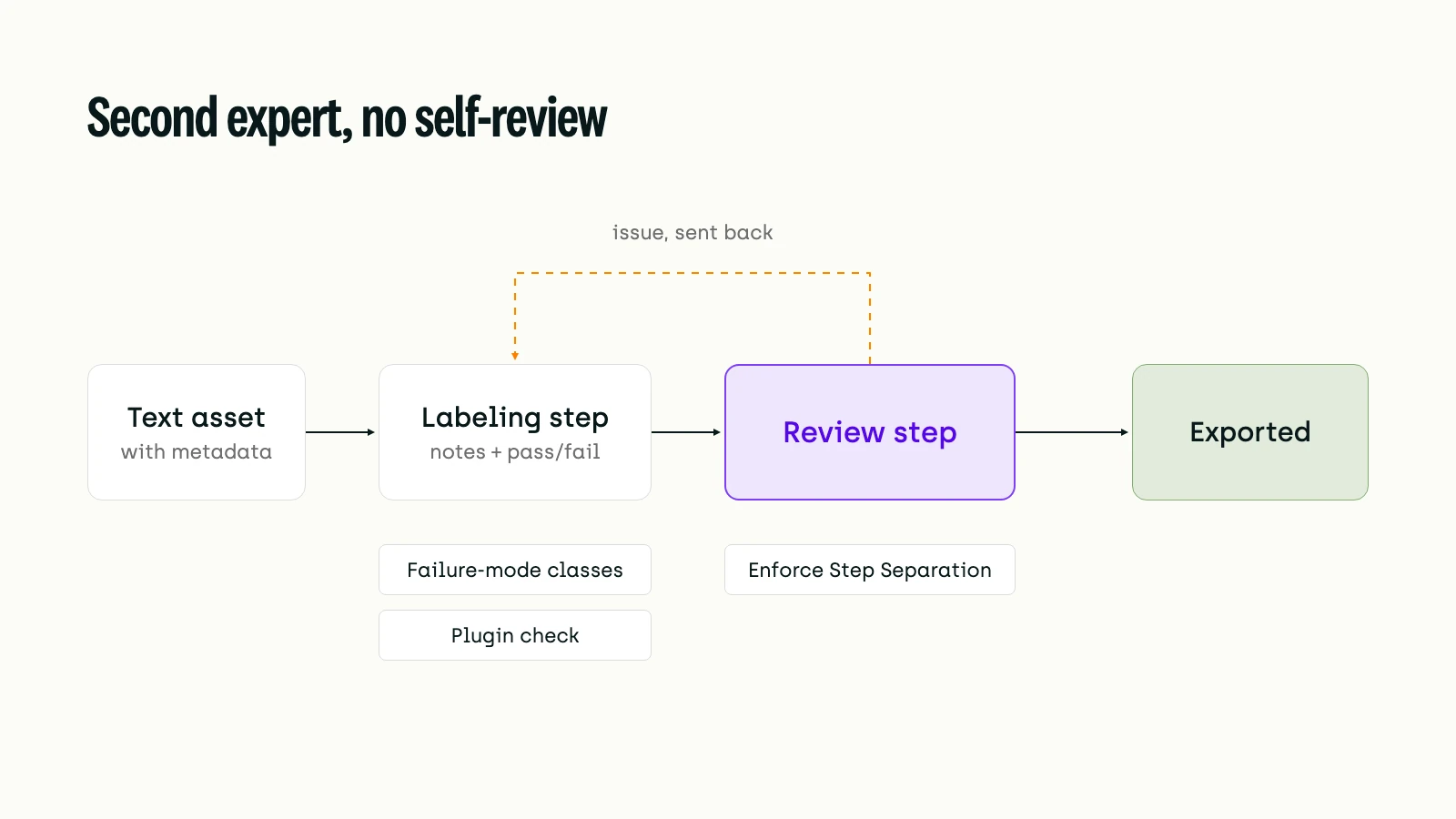
You import each trace as a text asset. What the reviewer needs goes in asset metadata, such as the feature, the model version or a guardrail flag. Custom metadata shows in a table in the labeling interface and works as a filter in the queue. The expert records open-coding notes in a transcription job (free text) next to a pass or fail classification. When the taxonomy settles, set up the failure modes as classes in a multiple-choice classification job. The Analytics page then shows class balance: the share of annotations in each class. That gives you the count for the traces labeled so far. To compare review cycles, export the labels at the end of each one.
Version 26.2.12 added new queue filters on label classes. The "is not" and "is neither of" operators exclude classes, and "No value" or "Has value" find assets with or without any label. Use them to pull every trace tagged with a failure mode, or every trace nobody has tagged yet. Version 26.1.41 added an "Is in" operator on external IDs. Paste a list of trace IDs, such as the ones a guardrail flagged, and the queue shows exactly those.
For a second opinion, a multi-step workflow adds one or more review steps after labeling. Enforce Step Separation is on by default. It stops a member from working on more than one step of the same asset, so no one reviews their own labels. A reviewer who disagrees can add an issue explaining why and send the trace back to the original labeler.
Checks that need code run as Python plugins hosted on Kili, triggered when a label is submitted or reviewed. A plugin can, for example, reject any "fail" label with no note and add an issue saying so. For traces that can't leave your infrastructure, Kili also runs on-premise on your own Kubernetes cluster.
Kili also has an interface for conversations and pairwise comparison of LLM responses, including static projects built from production conversations. It is in private beta and enabled on request.
Conclusion: The Taxonomy Is the Eval Spec
Every eval an LLM team runs is a claim about how its product fails. Error analysis is how that claim gets grounded in traces instead of guesses. The failure taxonomy that comes out of it is the specification for every assertion and judge that follows. The expert who wrote it is the reference those checks answer to. Criteria drift means that specification keeps moving, so the reading never fully stops.
That is also why the tool question follows the people question. A custom viewer is the right answer while one expert is still finding the categories. Then several experts start labeling against a stable taxonomy. They need review steps, a record of who decided and data that stays in place. At that point the tool is infrastructure, and infrastructure is usually cheaper to adopt than to maintain. As AI agents produce longer, multi-step traces, the reading gets harder and more valuable. LLMs can draft the first groupings. The domain expert still decides what counts as a failure.
Resources
Error analysis in practice
- LLM Evals: Everything You Need to Know (AI Evals FAQ) – Husain & Shankar (2026, living document), hamel.dev
- A Field Guide to Rapidly Improving AI Products – Husain (2025), hamel.dev
Research
- Who Validates the Validators? Aligning LLM-Assisted Evaluation of LLM Outputs with Human Preferences – Shankar et al. (2024), UIST
- Why Do Multi-Agent LLM Systems Fail? – Cemri et al. (2025), arXiv preprint
Qualitative coding methods
- Grounded Theory Research: A Design Framework for Novice Researchers – Chun Tie, Birks & Francis (2019), SAGE Open Medicine
Build or adopt
- About AI Evals – Hacker News discussion (2025)
Kili guides
- AI Model Evaluation Guide: Methods, Metrics, and Why It Determines Production Success – the methods and metrics that follow error analysis
- Who Judges the Judge? A Data Story on 541,000 LLM-Judge Decisions and an Annotator-Pool Audit
- How to Build Golden Datasets for Testing, Fine-tuning, and Evaluating AI Models
- RAG Evaluation Guide: Measuring Retrieval and Generation as Separate Problems
- AI Model Evaluation Workflow Guide: From Build to Monitor
- Data Labeling Platform: Build vs. Buy
Kili documentation
- Adding asset metadata – Kili docs (read 10 Nov 2026)
- Kili changelog, 7 October 2026 (v26.2.12) – "is not", "is neither of", "No value" and "Has value" queue filters
- Kili changelog, 29 July 2026 (26.1.41) – "Is in" operator on the external ID filter
- Workflow configuration – multi-step review and Enforce Step Separation
- Handling questions and issues
- Kili plugins
- Hosting – cloud and on-premise deployment
- Labeling LLM data – private beta
- Talk to the Kili team
Frequently Asked Questions
How many traces do you need for LLM error analysis?
Husain and Shankar recommend reviewing at least 100 traces, chosen for variety. Keep going until new traces stop revealing new failure modes, then review about 100 fresh traces each cycle.
What is the difference between open coding and axial coding?
Open coding is the first read: a short free-text note on what went wrong in each trace, with no categories yet. Axial coding groups those notes into named failure modes, which you can then count.
Can an LLM do error analysis for you?
Partly. An LLM can propose groupings of your notes once a person has coded 30 to 50 traces. The first read, and the final call on categories, should stay with someone who knows the domain.
Should LLM evals use pass/fail or 1 to 5 scores?
Pass/fail per failure mode. Binary labels force a clearer decision and are labeled more consistently than points on a five-point scale.
Ready to Put Your Domain Experts on Error Analysis?
Kili lets domain experts label LLM traces in a multi-step review workflow, with step separation, issues and Python plugins, in the cloud or on-premise. Talk to the Kili team about setting up an error analysis project.