.png)


_logo%201.svg)


AI Summary
Video Annotation Explained
Video annotation has become the cornerstone of computer vision development in 2026, with the market projected to reach multi-billion dollar valuations driven by unprecedented demand for high-quality training data. Whether you're building autonomous vehicle systems, developing medical diagnostic tools, or creating retail analytics solutions, understanding how to annotate videos effectively is essential for producing accurate AI models.
This comprehensive guide covers everything you need to know about the video annotation process—from fundamental concepts and annotation types to selecting the best video annotation tools for your specific use case.
What Is Video Annotation?
Video annotation is the process of adding labels, tags, and metadata to video data to help machine learning models understand and interpret visual content. Unlike image annotation, which deals with individual images, video annotation captures temporal context by tracking how objects move, interact, and change over time across multiple frames within a video sequence.
When you annotate a video file, you're essentially creating ground truth data that teaches computer vision models to recognize patterns, detect objects, and understand actions in real-world applications. This training data forms the foundation for supervised learning models that power everything from security surveillance systems to sports analytics platforms.
Video Annotation vs. Image Annotation
While image annotation involves labeling objects in individual frames, annotating videos introduces additional complexity due to their temporal structure. A video file contains hundreds or thousands of video frames that must be processed while maintaining consistency for the same object across consecutive frames.
Key differences include:
- Temporal continuity: Video annotation requires tracking the same object through a video sequence, assigning each instance a unique ID to maintain consistency
- Contextual information: Annotating video data provides more contextual information for AI models compared to annotating individual images
- Object tracking: Videos enable you to track objects as they move, change appearance, or become occluded
- Frame rate considerations: The frame rate of your video file determines how granular your annotation process needs to be
What are the Different Types of Video Annotation?
Several different video annotation methods exist. The right method needed for adding labels during a specific annotation project depends on the type of video being annotated and the annotated data used for. Some annotation methods include:
Bounding Boxes
Bounding boxes are rectangular frames drawn around objects to identify their location within video frames. This box annotation method is the most common approach for object detection tasks, allowing you to quickly identify and track objects throughout a whole video.
Bounding boxes work well when you need to:
- Detect cars, pedestrians, or vehicles in traffic footage
- Track objects moving through a scene
- Create training data for object detection models
Polygon Annotation
When objects have irregular shapes that bounding boxes cannot accurately capture, polygon annotation provides precise boundaries by drawing multi-point shapes around specific objects. This method delivers more accurate video annotations for complex shapes like buildings viewed from different angles or natural objects with curved edges.
Semantic Segmentation
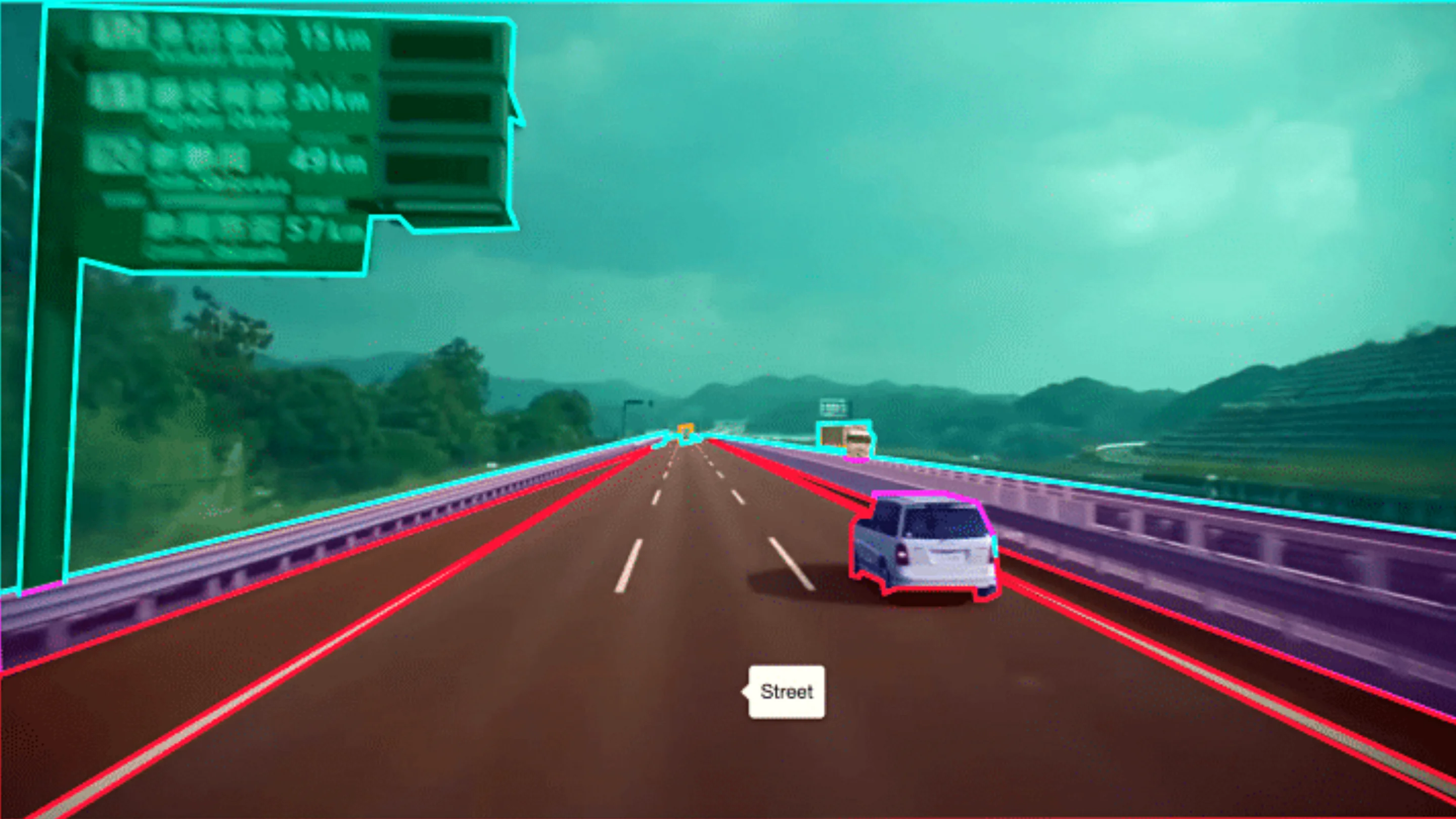
Semantic segmentation classifies every pixel in video frames according to predefined categories. This annotation type creates segmentation masks that enable AI models to understand scene composition at the pixel level—essential for autonomous vehicles that need to distinguish roads from sidewalks, or medical imaging systems analyzing tissue samples.
Instance Segmentation
Instance segmentation combines object detection with semantic segmentation, creating individual polygon masks for each object instance. Unlike semantic segmentation that groups all similar objects together, instance segmentation assigns each detected object its own unique identifier, allowing you to track specific objects across consecutive frames even when multiple instances of the same category exist.
3D Cuboid Annotation
3D cuboid annotation represents objects in three-dimensional space, specifying their size, orientation, and position within video frames. This technique is particularly valuable for autonomous vehicle applications where understanding spatial relationships between objects is critical.
Keypoint Annotation
Keypoint annotation marks specific points of interest on objects, commonly used for pose estimation in human subjects. By annotating data points on joints and body parts, you can train models to understand human movement and posture across video sequences.
How to Annotate a Video: The Complete Process
Step 1: Prepare Your Video Data
Before starting the video annotation process, organize your dataset to create a smooth annotation workflow:
- Extract frames strategically: Rather than extracting frames at fixed intervals, consider your use case—higher frame rates may be necessary for fast-moving objects
- Handle large video files: Break lengthy videos into manageable segments to optimize annotation software performance (our platform can handle videos with 100k plus frames)
- Establish clear guidelines: Create detailed instructions so all annotators interpret the raw footage consistently
Step 2: Select Your Annotation Tools
Choosing the right annotation platform directly impacts the quality and efficiency of your video annotation process. The best video annotation tools offer:
- Support for multiple annotation types (bounding boxes, polygons, segmentation masks)
- Object tracking capabilities across video frames
- Automation features like keyframe interpolation
- Export options in standard formats (COCO format, Pascal VOC, etc.)
- Quality management workflows
Step 3: Apply Annotations
When annotating videos, start by labeling objects in your first frame, then use your annotation software's tracking features to propagate labels across consecutive frames. Modern video annotation tools use smart tracking powered by AI to automatically follow the same object through multiple frames, significantly reducing manual annotation effort.
For accurate video annotations:
- Maintain consistency in how you label similar objects
- Use keyframe interpolation to automatically fill in intermediate frames
- Create good annotations by verifying labels at regular intervals
- Address occlusions by maintaining object identity even when temporarily hidden
Step 4: Review and Quality Assurance
Subjective annotation can lead to inconsistencies, as different annotators may interpret the same video differently. Implement iterative feedback loops between annotators and project managers to resolve questions and improve data labeling quality.
Video Annotation Challenges and Solutions
Time-Consuming Workflows
Video annotation is time-consuming because each frame must be annotated while considering the continuity of actions or objects across frames. Modern annotation tools address this through:
- Auto annotation: AI-powered pre-labeling that suggests annotations based on your own model or pre-trained models
- Keyframe interpolation: Annotators label the start and end of a sequence while AI tools automatically fill in intermediate frames
- Smart tracking: Automatically propagate annotations to track objects across the remaining frames
Scale and Volume
The large volume of data in videos—which can contain hundreds or thousands of frames—requires significant resources. Enterprise annotation platforms provide:
- Workforce management capabilities
- Distributed annotation across teams
- Progress tracking and analytics
- Enterprise support for large-scale projects
Data Privacy
Videos may contain sensitive information requiring protection. Look for annotation platforms offering:
- On-premise deployment options
- Role-based access controls
- Compliance with industry regulations (HIPAA for healthcare, etc.)
Real-World Applications of Video Annotation
Almost all modern businesses or industries can make use of video annotation in one way or another. As more and more of the systems we rely on become powered by AI, the list of applications for video annotation will continue to expand. While the specific annotation technique used will vary from sector to sector, in general, all industries can benefit from annotation. Some of the sectors which are already making use of video annotation are:

Autonomous Vehicles
Video annotation is vital for autonomous vehicle technology, allowing vehicles to monitor their surroundings and make decisions. Training data helps vehicles detect cars, identify lane markings, recognize traffic signs, and understand pedestrian behavior.
Healthcare and Medical Imaging
In healthcare, video annotation supports diagnostics, patient monitoring, and surgical training. Medical professionals use annotated video data to help practitioners identify specific cell types and biological elements under a microscope, train AI for radiology analysis, and develop assisted surgery systems.
Security and Surveillance
Video annotation helps CCTV cameras identify suspicious behavior and alert security personnel. By training computer vision models on annotated surveillance footage, organizations can automate threat detection and improve response times.
Retail Analytics
Retail organizations use video annotation to analyze customer behavior in stores, tracking foot traffic patterns, dwell times, and shopping behaviors to optimize store layouts and improve customer experience.
Sports Analytics
Video annotation helps track player performance, ball trajectories, and game strategies. Coaches and analysts use AI-powered video analysis to gain insights into player movements and tactical patterns.
Manufacturing and Quality Control
In manufacturing, video annotation enables inspection of finished products and identification of defects during production. Computer vision models trained on annotated video data can detect quality issues faster and more consistently than human inspectors.
Agriculture
Agriculture employs video annotation for crop monitoring and livestock tracking to optimize operations. Drones equipped with cameras capture video data that, once annotated, trains models to identify crop health issues or track animal behavior.
Content Moderation
Video annotation enhances content moderation on social media by automatically tagging sensitive content. Platforms use annotated training data to develop AI models that can flag inappropriate material at scale.
Traffic Management
In traffic management, video annotation trains AI algorithms to identify vehicle number plates for automated processes like toll collection, parking enforcement, and traffic monitoring.
Geospatial and Architecture
Video annotation supports architecture and geospatial applications by training algorithms to identify buildings and their features from aerial or satellite video imagery.
Selecting the Best Video Annotation Tools
When evaluating video annotation tools, consider these key capabilities:
Annotation Type Support
Ensure your annotation software supports all the annotation types you need—bounding boxes, polygons, semantic segmentation, instance segmentation, keypoint annotation, and more. The ability to combine multiple annotation methods within a single project provides maximum flexibility.
Object Tracking and Automation
Look for advanced features like:
- Smart tracking that automatically follows objects across frames
- Keyframe interpolation for efficient annotation of video sequences
- Model-based pre-annotation using your own model or pre-trained models
- SAM 2 integration for interactive segmentation
Format Compatibility
Your annotation platform should support importing various video file formats and exporting annotations in industry-standard formats like COCO format, Pascal VOC, and custom JSON structures.
Collaboration and Workflow
Enterprise teams need:
- Multi-user collaboration capabilities
- Customizable review workflows
- Consensus and quality metrics
- Integration with machine learning pipelines
Open Source vs. Enterprise Solutions
Open source video annotation tools like CVAT, Label Studio, and Diffgram offer flexibility and no licensing costs but may require more technical setup and lack enterprise support.
- CVAT is an open-source tool that supports various annotation types including bounding boxes, polygons, and keypoints for video data
- Label Studio is an open-source annotation tool that supports video annotation and offers features like pre-labeling based on existing models
- Diffgram is an open-source platform that supports video annotation and includes features for dataset and workflow management
Enterprise platforms like Kili Technology provide:
- Ready-to-use workflows optimized for video annotation
- Enterprise support and SLAs
- Advanced security and compliance features
- Scalable infrastructure for large datasets
Popular Machine Learning Models for Video Annotation
Convolutional Neural Networks (CNNs):
CNNs are the foundational computer vision models that use convolutional filters to extract spatial features from images or videos. For video annotation, CNNs can identify and predict bounding boxes around objects within frames of a video. To extend these directly for video data, 3D CNNs can be used, which analyze multiple structures together and capture temporal information. These architectures are suitable for a wide range of video annotation tasks due to their ability to learn hierarchical features from raw pixel data.
You Only Look Once (YOLO):
YOLO is a popular object detection model that can be used to identify and track objects within videos hence serving as an excellent architecture for video annotation. There are several ways in which YOLO can be helpful. It can annotate individual frames by localizing and labeling objects with bounding boxes and assigning class labels. YOLO can also be combined with various tracking algorithms such as DeepSORT to track things across multiple frames, which helps to incorporate temporal context. Additionally, the YOLO model is lightweight and is very efficient for real-time object detection.
EfficientDet:
EfficientDet is a similar object detection model to YOLO but has a few more advanced features which can be helpful for scaling the video annotation tasks. It is suitable for large-scale video annotation problems as it maintains a good trade-off between computational overhead and accuracy to provide competitive results. Furthermore, EfficientDet uses a multi-scale approach, which allows it to detect objects at various scales. This feature is crucial for video annotations as the same object can appear at different scales in different frames due to changes in motion or angle of the camera.
Recurrent Neural Networks (RNNs):
RNNs are designed to model sequential patterns in videos and extract their features. Models such as Gated Recurrent Unit (GRU) and Long Short-Term Memory (LSTM) are adequate to capture the temporal structure of videos in tasks such as action recognition by analyzing the motion frame-by-frame. However, these networks only work well to capture short-term dependencies and may struggle for long-term ones.
Two-Stream Networks:
These networks contain two separate streams of convolutional neural networks, one for capturing spatial information from individual frames and the other for temporal information by processing optical flow images representing motion. These are mainly used for tasks such as action recognition and they enhance accuracy by taking into consideration both appearance and motion cues.
Transformer-based Models:
Transformer-based models were initially developed for natural language processing. However, models like Vision Transformer (ViT) are suitable to handle the temporal structure of videos. One of the major advantages of these models for video annotation is that they capture global relationships across elements in a sequence which provides in-depth information. Additionally, self-attention helps focus on the most critical parts of the video and generate intricate annotations by considering contextual information across different time steps.
Each of the models described above have their own pros and cons but the selection of a model will depend on factors such as the dataset characteristics, annotation task or on number of computational resources available.
Best Practices for High-Quality Video Annotation
Establish Clear Annotation Guidelines
Create comprehensive instructions covering:
- Object definitions and edge cases
- How to handle occlusions and partial visibility
- Labeling conventions for specific objects
- Examples showing correct and incorrect annotations (include more examples for complex scenarios)
Optimize Frame Selection
Not every frame needs annotation. Strategic frame selection based on:
- Scene changes and new object appearances
- Object movement and position changes
- Critical moments requiring precise labeling
Implement Quality Controls
- Use consensus mechanisms where multiple annotators label the same video
- Establish honeypot assets to measure annotator accuracy
- Conduct regular reviews comparing annotations against ground truth
- Provide feedback loops to continuously improve annotator performance
Leverage Automation Intelligently
While automation features dramatically accelerate video annotation, always verify AI-generated suggestions. Use auto annotation as a starting point, then refine through human review to ensure training data quality.
The Future of Video Annotation in 2026 and Beyond
Video annotation continues to evolve with advances in AI and computer vision. Key trends include:
- Foundation models: Large pre-trained models that can be fine-tuned for specific video annotation tasks with minimal examples
- Active learning: Intelligent systems that prioritize annotating data most valuable for model training
- Synthetic data augmentation: Combining real annotated video with synthetic data to expand training datasets
- Collaborative human-AI workflows: Increasingly sophisticated AI assistance that handles routine annotation while humans focus on edge cases
As computer vision models become more capable, the demand for high-quality annotated video data only increases. Organizations that master the video annotation process—combining the right tools, workflows, and expertise—will build better AI systems faster.
Getting Started with Video Annotation
Ready to start annotating video data for your computer vision project? Here's how to begin:
- Define your objectives: What specific objects or actions does your AI model need to detect?
- Select appropriate annotation types: Choose bounding boxes for object detection, segmentation masks for pixel-level analysis, or keypoints for pose estimation
- Choose your annotation platform: Evaluate tools based on your scale, budget, and technical requirements
- Develop annotation guidelines: Create clear instructions with more examples to ensure consistent labeling
- Build your annotation workflow: Establish processes for annotation, review, and quality assurance
- Iterate and improve: Use feedback from model training to refine your annotation process
Whether you're building training data for a cutting-edge autonomous system or developing retail analytics, video annotation is the foundation of computer vision success. The right combination of skilled annotators, efficient video annotation tools, and robust processes will help you create the accurate video annotations your AI models need to perform in real world applications.
Looking for a comprehensive annotation platform that enables domain experts to create expert AI data? Discover how Kili Technology helps organizations build production-ready computer vision models with collaborative video annotation workflows, enterprise-grade security, and powerful automation features.