.png)

_logo%201.svg)


AI Summary
- Kili now supports native local projections for geospatial AI, eliminating spatial drift by preserving original coordinate systems.
- Variable frame rate video labeling is live — import real-world footage from dashcams and drones without preprocessing.
- New multi-select and line tools speed up accurate data labeling workflows across image and video projects.
- Project Creator roles and asset upload constraints give teams tighter governance over data labeling operations at scale.
The Accuracy Gap
Picture this: Your team is building an AI model for urban infrastructure mapping. You've uploaded high-resolution satellite imagery captured in a regional coordinate system—a local projection used by your national mapping agency. The model needs to detect road conditions, utility lines, and structural changes with centimeter-level precision.
But your labeling platform has been quietly reprojecting every image into a global coordinate system. Every annotation your team has drawn is off—not by much, but enough to matter when your AI needs to detect a crack in a bridge or a subsidence risk zone.
Or consider a different scenario: You're managing a 50-person labeling team on a large enterprise project. Overnight, a dozen new labelers independently created duplicate projects with inconsistent naming. Your data pipeline breaks. Your project manager spends a day cleaning up.
The result? Spatial inaccuracies that compound into model errors. Organizational sprawl that wastes engineering time. Annotation workflows that move slower than they should.
This was our focus for February.
Native Local Projections: Spatial Accuracy Where It Counts
The Problem in Practice
Geospatial AI projects live and die by coordinate precision. Whether you're training models for precision agriculture, autonomous mapping, infrastructure inspection, or defense applications, the spatial relationship between your annotations and the real world is the foundation of your training data.
Until February, Kili supported only EPSG:4326 and EPSG:3857—the two dominant global projections. Any image using a different coordinate system was automatically reprojected to EPSG:3857 for display. For global datasets, this was barely noticeable. For regional and local datasets—urban planning in a national grid, cadastral surveys, high-precision terrain analysis—the transformation introduced spatial drift that degraded annotation accuracy in ways that were hard to trace and harder to fix.
The Solution: Kili Now Preserves Your Image's Original Projection
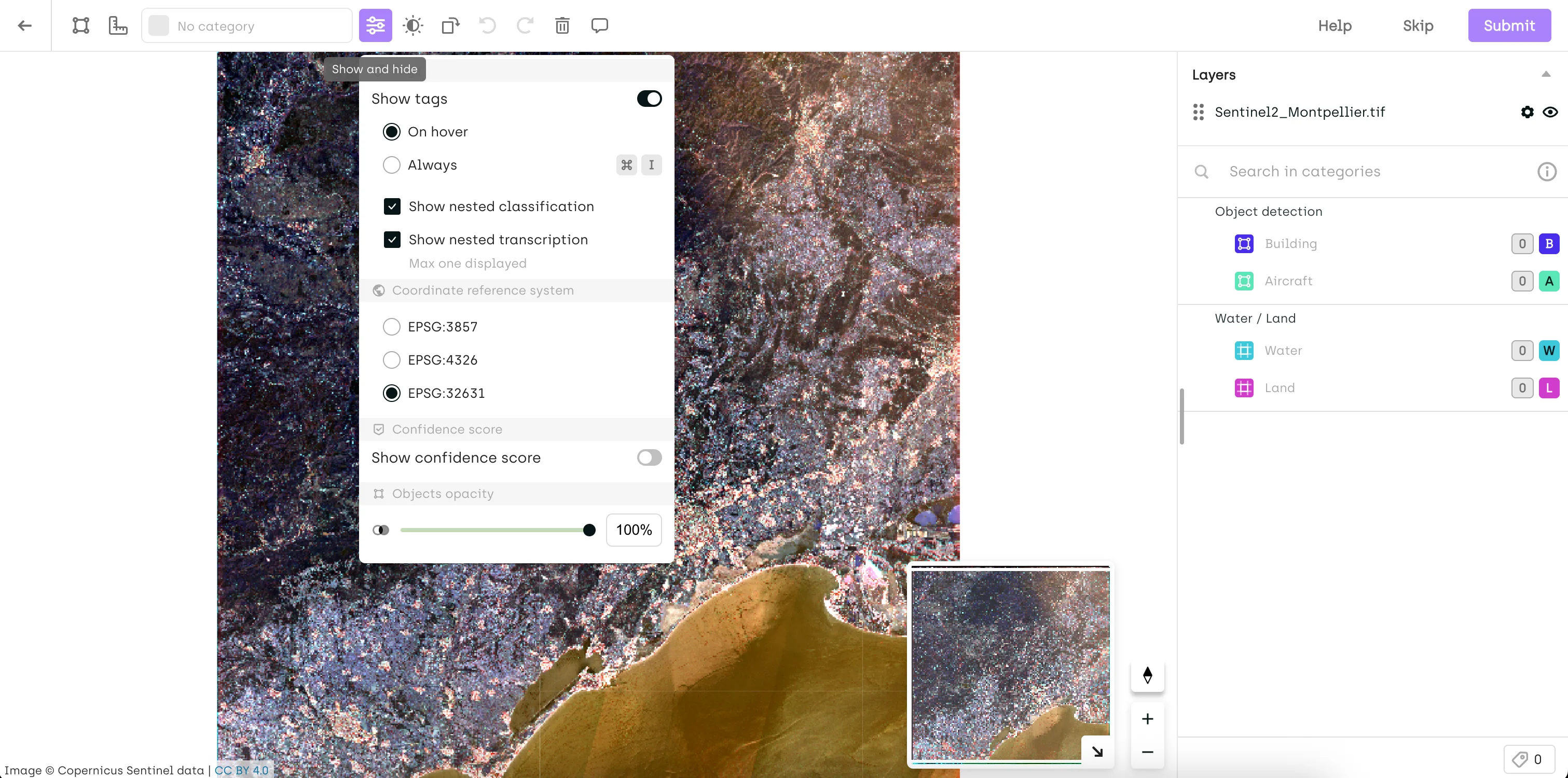
Starting this month, Kili natively supports the original projections of uploaded images and WMS layers—no reprojection applied. You can switch between available EPSG codes directly from the Settings menu.
If you need a base map overlay, you can still select EPSG:3857 (base maps require it), but your annotations will be grounded in the coordinate system your data was captured in.
Real-World Impact: Precision Mapping and Infrastructure Inspection
Consider any team working with imagery captured in a regional or national coordinate system—EPSG:27700 in the UK or EPSG:2154 in France, for example. Previously, reprojection into EPSG:3857 could shift annotation positions enough to misalign labeled objects from their actual ground positions—a small error that becomes a meaningful one when your model needs to detect precise boundaries, locations, or spatial relationships.
With native projection support:
- Annotations stay where they belong: No coordinate drift between what was captured and what was labeled
- Pipeline integrity: Exported annotations can be ingested directly into GIS tools like QGIS or ArcGIS without requiring post-processing correction
- Multi-layer alignment: WMS layers from different sources display correctly relative to your imagery
Time saved: What previously required a post-processing reprojection step—and still introduced residual error—now happens natively at zero cost to spatial accuracy.
Note for existing projects: If you previously annotated images using EPSG:3857, you may notice changes in how annotations render after this update—Kili now defaults to the image's original projection. To preserve the original rendering, switch back to EPSG:3857 from Settings.
Variable Frame Rate Video: Reliable Labeling for Real-World Footage
The Problem in Practice
Most training video doesn't come from controlled studio environments. It comes from dashcams that drop frames in low light, drones that adjust frame rate based on motion, action cameras that switch between recording modes mid-clip. The result is variable frame rate (VFR) video—and until now, Kili's frame management wasn't built to handle it cleanly.
The symptoms were subtle but disruptive: timestamp mismatches, frames that didn't align with their position in the timeline, annotation offsets that were difficult to diagnose. For teams building autonomous driving datasets, surveillance models, or action recognition systems from mixed-source footage, this meant either pre-processing every video to a fixed frame rate before upload—adding pipeline complexity—or accepting that some annotations would land on the wrong frame.
Neither option is acceptable when frame-accurate labels are what your model learns from.
The Solution: Native VFR Support
Kili now fully supports videos with variable frame rates. Frame management has been rebuilt internally to handle timestamp and frame-count discrepancies natively, so VFR footage behaves exactly as fixed-rate footage does in the labeling interface—no pre-processing required.
Real-World Impact: Mixed-Source Video Datasets
For a team building a driver assistance model from real-world dashcam footage:
- Upload VFR clips directly from the source—no conversion step
- Annotate with confidence that each label lands on the correct frame
- Export with accurate frame-level metadata for training
What changes: Teams that were normalizing frame rates as a preprocessing step can remove that step from their pipeline entirely. Teams that were tolerating frame misalignment now have accurate, frame-level annotation fidelity across their full dataset.
The broader implication is data quality. Frame-level precision in video annotation isn't just a workflow convenience—it's what separates training data that generalizes from training data that introduces subtle, hard-to-debug errors at inference time.
What Else Shipped in February

Multi-Select Box Tool on Image Projects
Building on the multi-select, copy, and paste functionality introduced in January, Kili now adds a dedicated Selection Box tool. Hold ALT (or Option on Mac) and draw a bounding box around any cluster of annotations to select them all at once—then move, copy, or delete in bulk. Useful for densely annotated images where individual click-selection slows annotators down.
Video Labeling: Line Tool Now Available
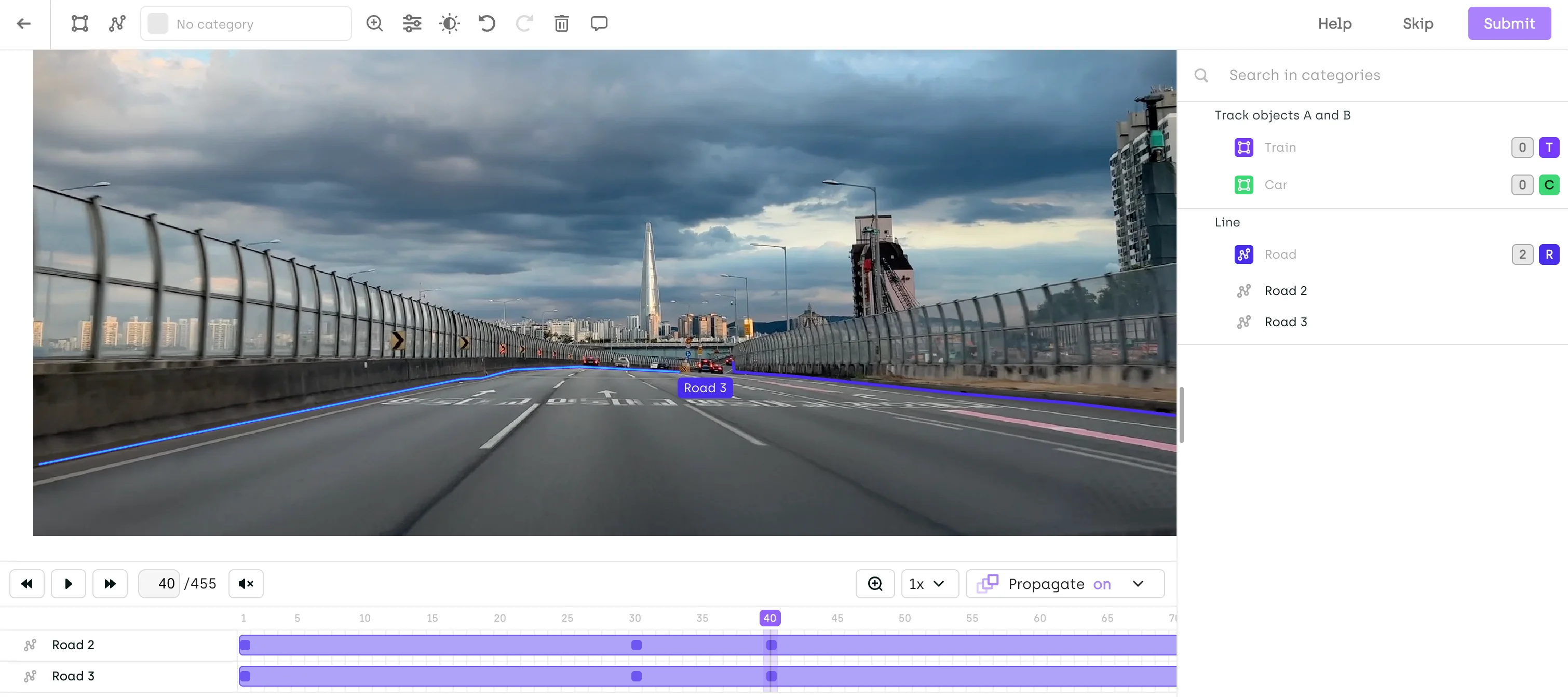
The Line tool is now supported in video projects. Enable it from your project's Interface Settings to annotate line-based objects—lane markings, conveyor paths, trajectory lines—directly within video frames. Note: Interpolation and smart tracking are not yet supported for the Line tool in video.
New Organization Role: Project Creator
Project creation is now a scoped permission. Previously, any user with the USER role could create projects across an organization. With this update, only users explicitly granted the Project Creator role can create new projects.
This matters at enterprise scale. Unconstrained project creation leads to sprawl—duplicate datasets, inconsistent naming, orphaned assets that clog your workspace. The Project Creator role gives org admins the governance lever they've needed.
Existing USER-role members will no longer be able to create projects by default. Grant the Project Creator role from the Organization Members page to any users who need it.
Free Asset Selection: Assigned Assets Only
Free Asset Selection—which allows labelers to pick assets in any order—now supports a new constraint: restrict free selection to assigned assets only. Labelers keep their flexibility to sequence work as they see fit, but can only access the assets explicitly assigned to them. For project managers balancing labeler autonomy with workload distribution control, this is the middle ground they've been asking for.
SDK: Manage Reviewers at the Step Level
Teams using the Kili Python SDK can now add or remove reviewers at the level of a specific project step using kili.add_reviewers_to_step and kili.remove_reviewers_from_step. Automate reviewer assignment directly in your pipeline rather than managing it manually through the interface.
Export Format: Latest Labels from the Last Workflow Step
A new export option is now available in the Export UI: "Latest labels from the last workflow step (for each asset)". This exports all latest labels from the last completed workflow step—including multiple labels in consensus mode—and is now selected by default. In the export schema, latestLabels replaces latestLabel. Update your scripts before the old field is deprecated.
Ontology: Up to 8 Levels of Subjob Nesting
You can now configure up to 8 levels of subjob nesting in your ontology—useful for complex classification hierarchies in taxonomy-heavy annotation projects.
Audit Trail (Early Access): Asset External ID Now Displayed
Events in the Audit Trail now show the Asset External ID, clickable to open the asset directly in the Explore Interface—closing a key navigation gap for teams doing annotation traceability work.
Under the Hood: Quality & Reliability Improvements
We've also resolved several issues that improve workflow stability:
✅ Annotation tags and relations are now hidden while moving or resizing objects for a cleaner editing experience
✅ Improved zooming and navigation performance in Geospatial projects
✅ Fixed an issue in LLM projects where conversation round order was not always preserved on import
✅ Multi-object selection shortcut updated to ALT/Option + Shift + Drag to avoid OS-level conflicts (applies to image, video, and PDF projects)
Getting Started with February's Features
Check Your Geospatial Projects
Native local projection support is live. If your imagery was captured in a regional or national coordinate system, verify that your projects are now rendering in the correct native projection—and switch back to EPSG:3857 from Settings if you need to preserve existing annotations.
Review Your Organization's Project Creator Permissions
If users in your organization need to create new projects, grant them the Project Creator role from the Organization Members page before they hit an access wall.
Include details about your team size and project structure. Our team will work with you to set up the right permission configuration for your organization.
Start Building Better AI Data
Whether your team is mapping infrastructure from the air, annotating video at scale, or managing a complex enterprise labeling operation, the quality of your training data determines the ceiling of your model's performance.
February's updates give you more spatial accuracy, more annotation speed, and more organizational control—so your data pipeline is as precise as the AI you're building toward.
If you're evaluating how Kili stacks up against alternatives, our updated 2026 data labeling services guide covers the full competitive landscape. And if your team is building out the oversight layer around your AI program, our deep-dive on scaling HITL AI evaluation covers the operational challenges in detail.
Ready to see these features in action?
Schedule a demo with our team →